5 Best Google Sandbox and Penalty Checker Tool in 2024

5 Best Google Sandbox and Penalty Checker Tool in 2024

Google Sandbox and Penalty Checker Tool to Use (2024)
Google sandbox and penalty checker tool can help you to find why your website is not ranking in Google. Google penalty checker tool helps you to find out whether your website got a penalty from Google or not so that you can take steps accordingly to improve the condition of your site. Sometimes getting penalized by Google deindexes all your pages from Google.

Google sandbox checker tool helps you to find whether Google put your website in sandbox or not. The sandbox is a term described by SEO experts to explain the situation where Google refuses to rank new websites and conducts some research before ranking them. Sandbox can also happen if Google penalizes you website and hence Google stops ranking your website or even showing your website in the search results. 

Now, if you want to check what the possible reason is that your website is not ranking in Google even though it has quality content, this Google sandbox and penalty checker tool can help you reason for that. In this article I have listed some Google sandbox and penalty checker tools you can use in 2024 also explained how to use them.

Top Google Sandbox and Penalty Checker Tools

These are the tools that can help you find Google sandbox and penalties,

1. Google Search Console

Google Search Console is a free set of tools for webmasters provided by Google. So how to use Google Search Console to find sandbox and penalties? You can do that just following two steps,

1. Check for manual actions and security issues

Google Sandbox and Penalty Checker Tool to Use (2024)
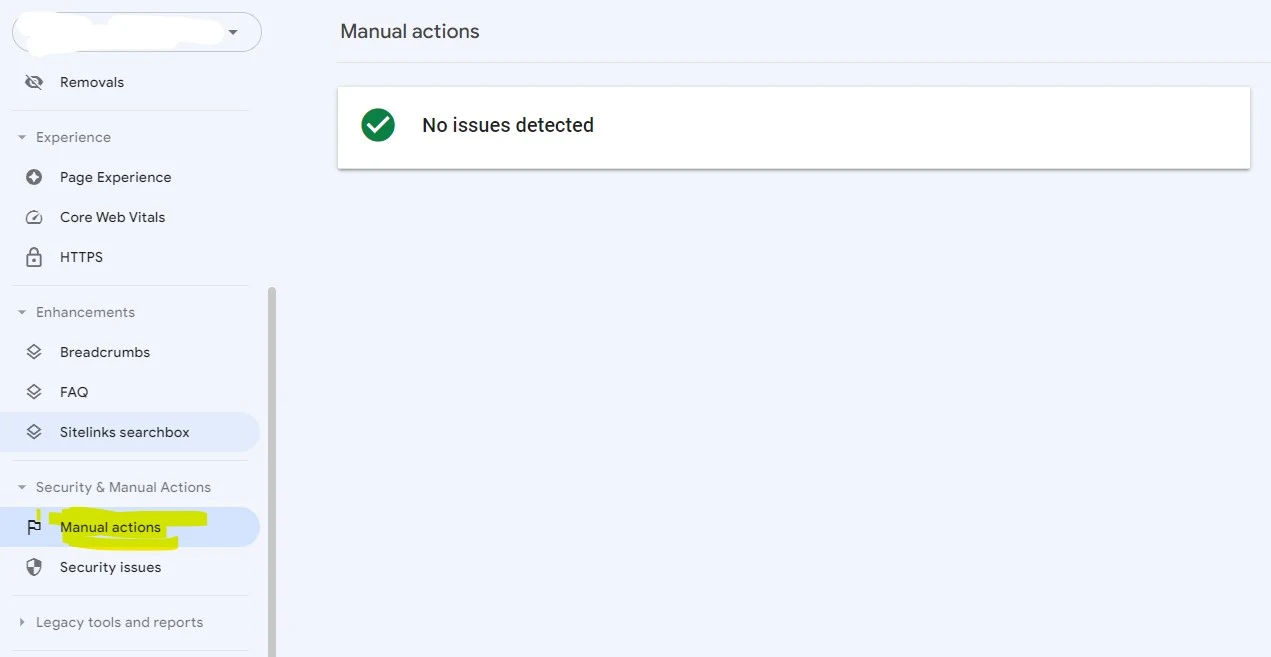
Like stated in the above image from menu section of Google search console go to "Security  & Manual Actions" then click on manual actions to check if Google penalized your site and put your site in sandbox or not.
Google Sandbox and Penalty Checker Tool to Use (2024)
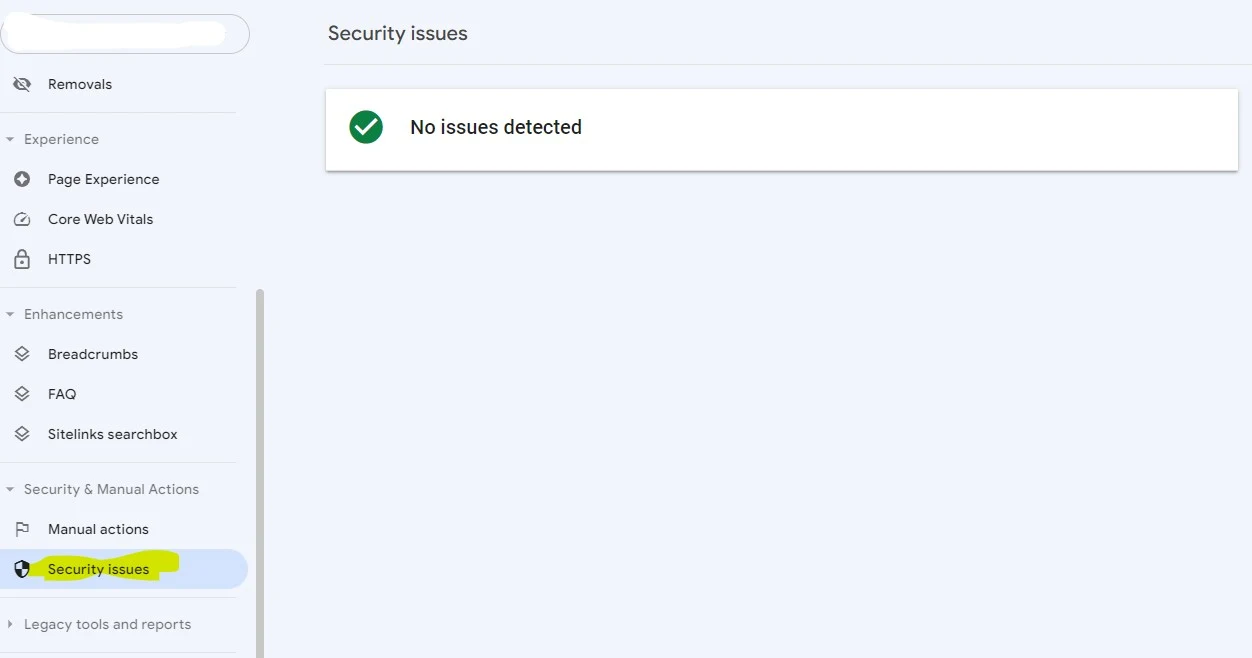
Now again go to "Security Issues" from "Security  & Manual Actions" and find if there is any security issues found. 
Fixing this manual actions and security issues will fix penalties of your site and will remove your site from Google sandbox. 

2. Check Performance Issues

Google Sandbox and Penalty Checker Tool to Use (2024)

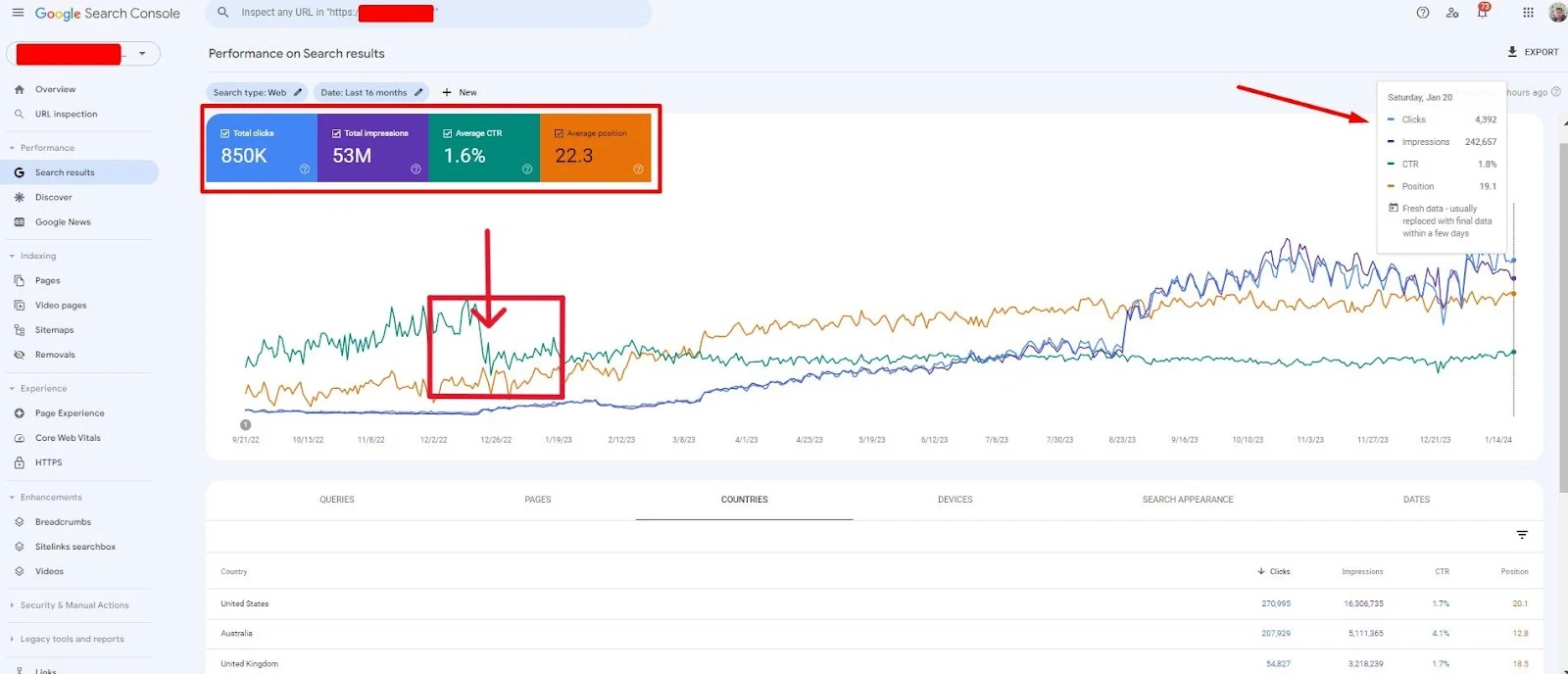
If you find any sudden drop in impressions and clicks in the performance tab, there is a high possibility that Google penalized your website and it is now in the sandbox. However, with continuous posting of high-quality content, you can earn Google's trust back.

2. Moz Google Algorithm Change History

Google Sandbox and Penalty Checker Tool to Use (2024)
Moz Google Algorithm Change History helps you to find all the Google algorithm core updates and their released dates. If you find sudden drop in impressions and clicks during the period of an core update that's because Google penalized your site and there is no doubt in that. 

Thus you can find if your site was penalized by Google from this tool. You can also find update related information and what's changed during this core update period from this tool.

3. Semrush Sensor

Google Sandbox and Penalty Checker Tool to Use (2024)
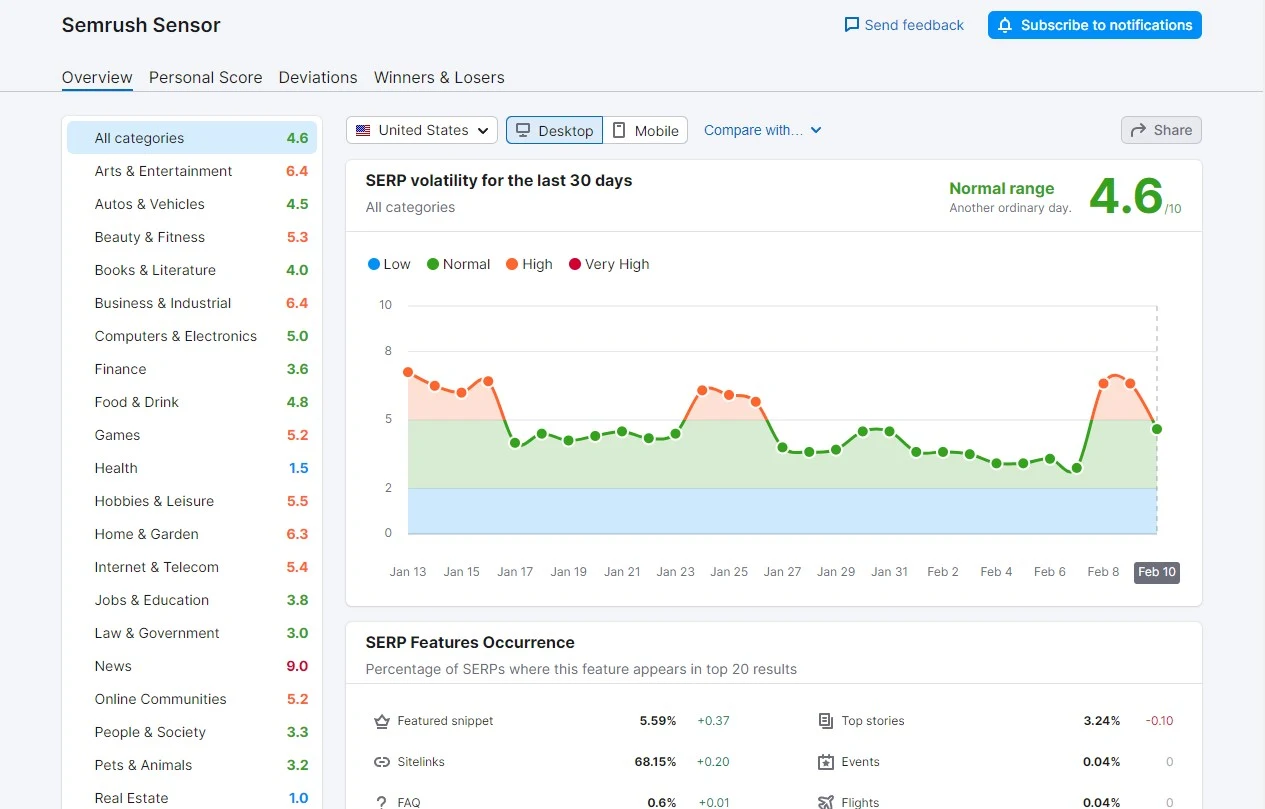
Semrush Sensor is a tool that indirectly helps you to check Google Sandbox and penalty. Semrush Sensor works by showing the search volatilities of different website niches. This tool shows which niches were more prioritized by Google and received more traffics than usual.

This tool also helps to find which websites were the winners and which were the looser under specific niche.

4. Paguin Tool

Google Sandbox and Penalty Checker Tool to Use (2024)
Panguin tool helps you to check Google Sandbox and penalty, all you need to do is sign in with Google Analytics account which connected to your website. Then you'll be able to see your traffic data during Google update period and also can find out if your website is penalized or not by traffic fluctuation data.

5. Fruition Penalty Checker

Google Sandbox and Penalty Checker Tool to Use (2024)
Fruition's penalty checker tool works by using a statistical analysis and provides a clear understanding into which Google updates have the most significant impact on your website. Then, suggests you what you should do next to recover from the penalty helping you remove your website from Google Sandbox.

Tips for Avoiding Google Sandbox and Penalty

To avoid your site being penalized or moved to Sandbox by Google follow this tips,
  • Avoid black hat SEO techniques.
  • Avoid unnatural link buildings.
  • Avoid buying links.
  • Avoid creating spammy contents.
  • Start writing helpful contents for your users.
  • Avoid copying contents from other websites.
  • Monitor backlinks regularly and disavow any toxic or spammy links that could harm your website.
  • Regularly update your website with fresh and relevant content.
  • Avoid keyword stuffing.
Top 10 SEO Content Writing tips Everyone Should Know

Top 10 SEO Content Writing tips Everyone Should Know

Top 10 SEO Content Writing tips Everyone Should Know
Almost everyone focuses on factors other than SEO-optimized content. What they don't talk about is that "Content is King," and Google and other search engines prioritize content more than other off-page SEO factors. Google's recent algorithmic updates enable SEO to revolve around content.

In this article, I will explain 10 tips for SEO-optimized content writing.

Here are ten of the key concepts to keep in mind while writing contents for SEO:


Content matters

Like I said, it’s important to remember that no matter what your subject matter is, your content has the potential to reach a large audience and help your company beyond the SEO benefits. Website content, articles and blog posts are ways to connect your company to relevant, interesting information about your industry. 

Creating content that is well-written and focuses on interesting topics in your industry will help it go beyond increasing your page rank by being linked to and shared by outsiders.

Stay on topic

Writing content optimized for SEO is not the same as writing your personal blog! There’s nothing wrong with adding some personality to your writing - this helps to keep the readers intrigued. Just make sure that you stay on the topic you are writing about and avoid drifting into unrelated areas.

Write compelling headings 

The titles of web pages and articles are the important things to focus while writing for SEO. Don’t use a generic, boring headline which simply describes what the article or web copy is about. Instead, think like a newspaper headline writer and develop a headline which makes someone want to read more. 

According to a study, Google rank those pages on top which has a higher click through rate than the others. And higher click through rate can be achieved only by attention grabbing titles.

Ideal keyword length and density

Content written for articles should be 300 to 1,000 words in length. Blog posting can be shorter. The length of your article will largely be determined by the number of keywords you are using: a keyword for every 50 to 100 words of content is a good rule of thumb.

Add keywords to the bio

Biographical information given for a magazine story or an article for a directory submission is a great chance for you to enhance your credentials and also optimize your content. Make sure that you include one keyword in your bio.

Don’t stack keywords

Cramming keywords in an article or page of web content (such as being part of a list) looks unprofessional since all of your linked keywords will be running together on the page. Spread your keywords evenly throughout the article so they look more organic.

Use meta descriptions

Meta descriptions are 150 character descriptions of your content and are excellent opportunities for optimization. Make sure your content has meta descriptions with keywords included. This is a great way to get Google to recognize your content and increase its value.

Write and tag hierarchically

In order for Google and other search engines to give your content the highest placement possible, it’s important that it looks professional and well-structured. Using the appropriate tags for your content will do this. Use h1 tags for titles, h2 tags for subtitles and so on. 

This concept will also help your writing by encouraging you to put your most compelling ideas first.

Write original content

Having duplicate content is a major no-no for search engine optimization, so don’t just “copy and paste” content from existing sources. Make sure your content is fresh and original - even copying your own content is a poor SEO decision.

Choose relevant images

Creative Commons search tools like the Google Image Search Assistant will help you find intriguing images that are free to use without risking copyright infringement.
How to Get Ranked for Your Website Name - Easy and Fast

How to Get Ranked for Your Website Name - Easy and Fast

How to Get Ranked for Your Website Name - Easy and Fast
There’s a lot of advice out there on how to get ranked for some competitive keyword terms (like weight loss, credit cards and so on). What about ranking first for your websites name (if you have a new site)? If you have a domain named 2ndwebdesigner.com, that doesn’t mean you’ll be #1 for ’2ndwebdesigner’ or ’2nd web designer’ immediately! Why? 

We will try to explain that also we will explain how you can get ranked for your website name.

Put in rough terms, Google ranks websites using 2 criteria:
  • Relevancy
  • Authority

Relevancy

Example: If you try to rank #1 for ‘wedding flowers’ and have a page on your site for that term, Google will try to use several criteria to determine how relevant your page is for people that use that keyword ‘wedding flowers’ (or variations) and rank you accordingly.

Nobody knows all the factors Google uses to determine how relevant a page is for a specific keyword. The best type of evidence we got so far is 1) correlation evidence 2) making your own index of the web and trying to match it with Google’ index. A lot of resources are required to do both of those things (dedicated servers etc.)

Fortunately, for us, there are a few good companies that do this like Moz who constantly find correlation data and make various compartments. Their latest on relevancy is the LDA. It’s a very complex algorithm and it is suspected Google uses some variation of it in order to determine how relevant a page is for a specific keyword.

But in your case, you just want to get ranked for your website name. So the fact that your URL (2ndwebdesigner.com in this example) matches the keyword ’2ndwebdesigner or ’2nd web designer’ tells Google that your homepage is EXTREMELY relevant for those keywords Put in simple terms, a navigational queries is a keyword you type when you’re looking for a specific site, like Microsoft, or 800 Flowers.

Authority

This is where you need to focus on if you want to rank for your websites name. The primary reason why Google is not ranking you for your name is because you have no (or very little) links. Authority = links, put in rough terms.

Now, I wish things were that simple :) Authority = links, so go and get more links, right? Yes and no.

Yes, you need to get more links but if all of those links are from 1 unique root domain*, then your ‘authority’ is limited.

*unique root domain = a domain from 1 root URL. For example, if you get a link from a page on yahoo.com, then that’s 1 unique root domain. If you get a page from news.yahoo.com (a subdomain) that still counts as 1 root domain. If you get links from a page on cnn.com, bbc.com and news.cnn.com that’s 2 unique root domains.

Okay, why do links from unique root domains matter? Because search engines most probably use them as one of the major ranking factors. It is one of the hardest things to manipulate. You can easily get 300 links from 1 domain, but what about 300 links from 300 domains? It would take 10x, maybe 100x more time. Speaking generally, the harder a link is to get, the more valuable it is.

How to build ‘authority’ in the eyes of the search engines

We now know that we need links from a diverse number of domains in order to build authority in the eyes of the search engines. Now the hard part comes…where to get links from? To get ranked for your websites name, you can get started by submitting your site on some simple social bookmarking sites.

You can submit your site on,
There are many more…but I found these are a) reputable b) high authority.

Do a guest post

Know someone who owns a blog? Ask him for a guest post and add a link to your site at the end of the article. This should help a lot, especially if your friend’s site has some popularity. You can also ask strangers who have blogs to do a guest post for them, nowadays writing guest posts is a very hot topic.

Explore more link building methods

There are so many link building methods out there, it’s impossible to explore them in one step.

Please avoid doing black hat methods at any cost. Especially at the beginning. By black hat I mean doing things like buying links.

I would define buying links as DIRECTLY exchanging money for a link without any editorial control in the process. Buying link building services is NOT buying links because a) there’s an editorial control to check whether your site is family-friendly and b) you’re not exchanging money for links directly, you’re exchanging your money for some other persons’ TIME. 

That person will then use his time to go to websites that provide links for free and get them. You could easily obtain those links as well without any money investment.

Start lowly

If you’re not doing anything black hat (like using a software tool to blast 100.000 links in a day, which is obviously a way to game the search engines), you should be fine. I’m pretty careful with any new site I build and try to rank it first for its NAME. 

I’ve seen so many people who haven’t ranked their sites for their names and they go for phrases like ‘coding blog’ or whatever. In our example, you first want to be #1 for ’2ndwebdesigner’ for ’2ndwebdesigner’ and ’2nd web designer’ before going for terms like ‘webdesign blog’ or a ‘design blog’.

What about getting those links naturally?

You can do that as well! (actually search engines prefer you get natural links above all other types). If your site/page gets popular on Digg, StumbleUpon then you’ll get a bunch of natural links and you should rank for your websites name pretty fast. 

So that is an option too. Although I’m noticing that people who link naturally are migrating to Facebook/Twitter and search engines haven’t catched up yet (they need to give more weight to links from different profiles from Facebook and Twitter).
Best SEO Tips for Ranking Faster - Works Quickly - 2024

Best SEO Tips for Ranking Faster - Works Quickly - 2024

Best SEO Tips for Ranking Faster - Works Quickly - 2024
It’s no secret that SEO involves granular changes across multiple metrics to optimize a site, yet each layer of the respective SEO onion has its place in the hierarchy of relevance which you can use to fine-tune rankings and results. In this article I will give you 20 SEO Tips which certainly will improve your ranking on Google fast.

From my experience working on SEO for the past 4 years, these tips will certainly improve your ranking on Google. These 20 tips cover everything from the basics to some of the advance SEO techniques we use daily to dominate competitive verticals. We hope you learn better SEO practices from the list and feel free to add a few of your own in the comments section. Also this tips will help you to avoid common SEO mistakes.

Canonical Issues

Check canonical issues to make sure there is a preferred default page or domain preference (http:// or www).No reason to have 3 variations of a home page .html, .php and default.htm, depending on your programming platform, server settings (Unix or Windows) as well as if you are using static pages or a content management system you will need to consolidate your website to either http:// or http://www to avoid splitting your site into less potent slivers.

Indexation and Crawl Frequency

See how many pages are crawled in a site to determine crawl frequency. If you have a home page that is crawled regularly and your internal pages are ignored, then this is often a result of lack of internal or external links.

You can implement sitemaps on a folder by folder basis, then link from the footer in a site template to a master sitemap page (where all the mini sitemaps are linked to) to increase indexation. This way the link from the footer consolidates the ranking factor to one page and THAT page feeds the various site maps equivocally (through a tiered drip-down site architecture effect).

Orphaned Pages and Dead Ends

Check for orphaned pages to determine if pages are linked sufficiently to ensure crawling.
If you have a page or sub folder in a website that is only linked to from a few pages, then you cannot possibly expect that page to rank well in search engines. If you yourself will not “endorse” a page by linking to it properly (contextually from keywords in the body copy) or from the primary or secondary navigation, then you cannot possibly expect search engines to pay that page with any more credence than yourself.

Also be weary of PDF files (which can rank on their own and sponge link flow from your website). Make sure PDF files have absolute links (use the complete URL) back to your site, so they do not pool ranking factor and trap it where the rest of your site cannot benefit.

Dynamic URL’s 

If pages are dynamically created, try to remove or rewrite as many parameters in the URL as possible or use URL / Mod rewrite.

Any time you have session data or query string parameters in a URL, you are decreasing the possibility of indexation. Particularly if there are conventions such as ?PID=23D-55.aspx trailing along, when a SEO friendly naming convention could have taken its place with a bit of programming. You can rewrite entire segments, sub folders, categories, etc. without losing functionality or compromising SEO value.

Naming Conventions

Use proper naming conventions (subject or keyword first, then plural variation, modifier, then tag line).

Create a hierarchy based on a relevant platform of topically reinforcing semantics using keyword clusters and related synonyms to toggle relevance from what search engines deem as the co-occurrence matrix.

Manage Outbound Links 

Try to cap outbound links per page to fewer than 50 links for larger pages (10 for top level pages that need more ranking factor).

The more links that leave a page, the less ranking factor the elements on that page have as equity. The only instance when this is not a concern is if the page itself is augmented from other strong internal pages or have strong inbound links from other sites to offset the hemorrhaging effects of excessive links leaving a page.

Footer / Site wide Links

Use footer links sparingly by tactfully to tie site segments together. Footer links still work (using 5-10 keyword-rich text links at the bottom of a page), but that can also diffuse the intent of pages that do not have enough content to distinguish themselves from other pages. 

If a page in a site does not have more than 300 unique words on that page, it can lose relevance as the navigation and other code structures collapse and all interject their shingles to offset or diffuse the pages unique purpose and optimal continuity.

For example if you have a page that is only a paragraph or two and you expect that page to rank for specific keywords, your navigation alone may trump the relevance for that page. Check your cached pages in text view to see how search engines view your code and your content without style sheets or java script .

Footer links can help bring balance to pages with less content, but use them on pages with enough content to weather their contribution.

Broken Links

Check for broken links which could be hemorrhaging link flow and weakening a site from within.
Broken links irritate search engine spiders, and when they cannot connect the dots, your sites rankings suffer. 

Alt Attributes in Images

Use alt attributes on images to preserve content integrity while providing internal links for ranking factor.

Using the alt attribute in images allows you to reinforce topical relevance with the on page text based content to improve a pages relevance score.

Anchor Text Optimization

Use pertinent anchor text and do not waste link equity from excessively linking to non reciprocating pages within a site.

Employing anchor text optimization means using relevant keywords to link to relevant pages within a site. Do this enough and before you know it you are virtual theming (which means creating a secondary navigation contextually through keyword co-occurrence).

This alone can distinguish your site from competitors as each granular layer consolidates ranking factor for a website. This alone is one reason why Wikipedia dominates search results, due to virtual theming.

Flattening Site Architecture

Keep site architecture as flat as possible or use breadcrumbs to aid in information architecture and crawling.

Avoid using sub folders excessively within a website domain.com/categories/products/color/page.html vs. flattening the URL and site by using more descriptive naming conventions for a page domain.com/electronics-black-sports-watch.html.

The closer the more competitive keyword landing pages are to the root folder, the easier it will be for them to gain additional ranking factor, page rank and page strength to express the content on that page.

Content Volume

Ensure you have enough content to topple a competitive keyword. Trying to rank for a keyword with 5 million competing pages with a handful of content is an exercise in futility. You will need topical relevance which means articles, posts or pages all internally linked and consolidated to create the proper on page signals for that keyword.

For every keywords there is a relevance threshold and tipping point, you will need to offset competitors by having more on page affluence as well as off page peer review (links from other authorities). However, in either case, content is a requirement.

Contextual Links 

Link contextually within related document to select preferred landing pages through virtual theming.

The premise is simple, if you are on a page about engines, and have a keyword pistons appear, then link the keyword pistons to the piston page. Do this for every keyword (only once per page if it appears more than that) and you have just added a virtual theme to your keywords. This means that each page can now work together collectively to support the parent theme (which is the main/root keyword itself).

Meta Tags

For larger sites, exclude meta descriptions but for smaller sites, use the meta data as an extra title or place for alternative keywords.

Always use a succinct and relevant title, but if you have multiple pages on a topic, then let search engines decide which keywords are more prominent and relevant by excluding the meta description / snippet from the page.

Also make sure that if you are using a content management system that your pages do not all share a common, generic meta title or description as a default. This is the fastest way to shoot down rankings in a site (lack of character).

Deep Links

Get at least 5-10 inbound links to each page via deep links from other sites in order to create buoyancy.

A page without links either from the site itself, or other sites is a page that has little value to readers or search engines. Popularity matters and for the millions of site owners who may or may not be aware of this simple fact, you MUST have deep links to a page if you want that page to exceed standard normalization.

A website replete with deep links (links to other pages other than the homepage) will start to have those individual pages rank and appear for multiple keywords. Not only does this create a more robust user experience, but the dependency for your rankings is not tied to an off topic or generic page like the homepage.

The take away here is, get at least 5-10 inbound links to each page minimum (if that page is expected to gain traction) otherwise, link to another page that is the preferred landing page and get deep links to it.

Keyword Stemming

Link to a page with multiple anchors (to create keyword stemming) and with “exact match” keywords to elevate just that term.

You can control how each page in your website ranks by being mindful about internal and external lining habits.

RSS Feed Syndication

Set up multiple RSS feeds within a site to syndicate your content to attract natural backlinks from other sites.

A proper RSS campaign alone can build sufficient links for your website. Combined with a content development strategy and time-released topical content, this alone can drive traffic and increase domain authority to produce rankings and relevance in even the most competitive vertical markets.

Trust Rank 

Linking from aged pages can pass along trust to new landing pages or sub folders or sub domains. Don’t look past your own site for ranking factor.

Passing along trust rank can save you months of waiting for search results to mature from fresh content. This method is designed to augment on page SEO and consolidate ranking factor from all pages to the new preferred landing page.

Sitemaps

Use sitemaps to not only tie the site together, but also as a way to nourish pages like an irrigation system through linking to them.

Sub Domains

Despite abuse in the past, sub domains still work. If your website is sagging under its own weight, then segment a new section of the site with a subdomain to emphasize topical content or to topple a competitive keyword vertical.

Search engines pay particular attention to keywords in the URL and while you cannot always make the best of a bad situation, sometimes you can create islands of relevance using a keyword rich subdomain to augment your existing website to create a new beacon of relevance.

The choice ultimately is up to you, or even using a combination of both is entirely relevant. Site architecture must work in tandem with content, links and conversion. All are mere pieces of the puzzle until consolidated.